 Breadcrumb
A timeline of where you have been.
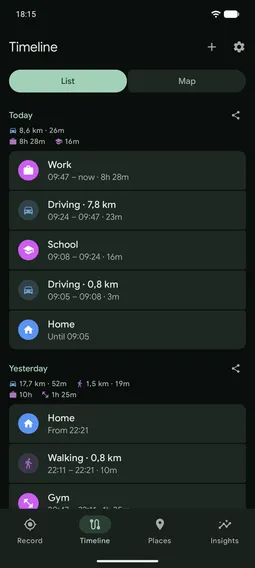
Breadcrumb is an Android app that keeps a timeline of where you have been. Each day shows the trips you made and the places you stayed at in between. Trips are recorded on their own, from the phone's detected activity. Everything stays on the phone. There is no account and no server.
How trips are recorded
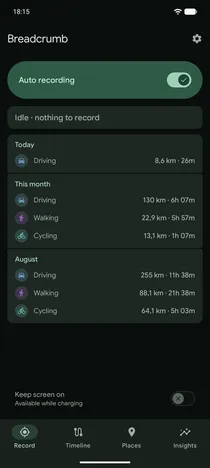
Turn on Auto recording and the app records a trip whenever you move. Your phone tells it when you start walking, running, cycling or driving, and when you stop. Each trip is labelled with how you moved. If the phone cannot tell, the trip is labelledMoving. You can change any label later, including to taxi, boat, public transit or flight, which the phone never detects on its own.
The app uses GPS only during a trip. Between trips it only watches for you leaving where you stopped, which uses little power. On a train or in a taxi the phone sits still, so it can miss that a trip began. The watch catches it.
Stays and places
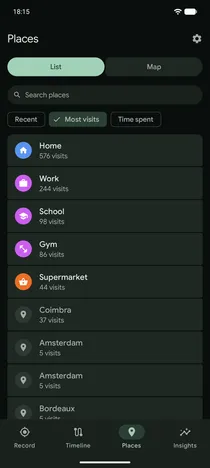
A stay is the time between one trip and the next. When your stays keep landing in the same spot, the app makes it a place. You can name the place, give it a category, and set how far around it still counts as being there. Once named, every stay at that place carries its name, past and future. The Places tab lists your places with their visits and shows them on a map.
A category is home, work, shopping and so on. For a place you have not categorised yet, the app suggests categories based on the places you already have.
Journeys and statistics
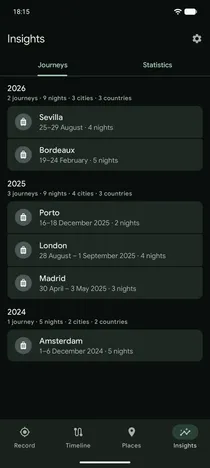
When you spend nights away from the place you tagged as home, the app makes them a journey. Each journey is named after the places where you spent most of it. Insights counts your journeys, nights, cities and countries per year. City names are built into the app, so nothing is looked up online. While you are away, times are shown in the local time of the place, not your phone's.
Statistics shows one month's trips and places against the year behind it.
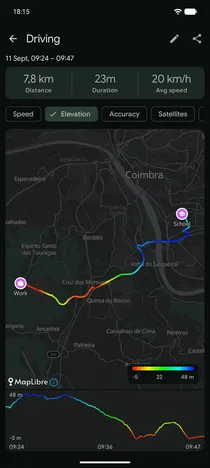
A trip's track
The app draws each trip's track on a map. You can colour it by speed, elevation, accuracy, satellite count or signal strength. The map also shows the positions the app judged unreliable, the stops it detected along the way, and the named places at each end.
If a trip was not recorded, you can add it by hand from two points on the map and two times. Start from the gap in the timeline. If a short stop split one trip into two, you can merge them. If one trip should have been two, you can split it. Both can be undone.
Where the data goes
- Everything is stored on the phone. There is no account, no sync, no analytics and no ads.
- The network carries map tiles and one optional thing: the place search you can use when adding a trip by hand. It sends the words you typed. Once either end of the trip has a point on the map, it also sends that point, so the results are the ones most relevant to your trip. You can turn it off under Settings → Privacy.
- You can back up your whole history to a single file and restore it from that file.
- You can import trips from GPX files, and export them one at a time, by day, or all at once.
- A deleted trip waits in Recently deleted for two weeks, where you can restore it.
- An optional app lock asks for your fingerprint or PIN when you open the app. It can also hide the app from screenshots and the recents switcher. Recording carries on whether the app is locked or not.
The privacy page has the details.
Installing
Breadcrumb is on Google Play in closed testing. Google requires a new app to be tested by a closed group before it can be published to everyone. Anyone can join, and every tester who stays opted in brings that release closer. Use the Google account your phone uses for every step below.
What it needs
- Location set to “Allow all the time”. The app records while it is closed, and Android shows an ongoing notification while it does. Turning Auto recording off stops the recording.
- Physical activity, notifications and an exemption from battery optimisation. The app asks for each when you turn on Auto recording.
- Google Play Services, for activity recognition.
The steps
- Join the testers group
- Opt in to the test
- Install from Google PlayIf the store page does not offer the install yet, wait a while and try again.
The viewer
The viewer is a page on this site that opens a Breadcrumb backup file in your browser. It shows every trip on one map, with the same timeline of stays and places the app shows. The file stays in your browser. Nothing is uploaded, and the only network use is the map, from Protomaps.
A backup is made under Settings → Back up everything.